soink
FeaturesStoryPricing
Download for Mac
Overview
What is soink?How does hands-free actually work?How is soink different from other dictation apps?Does soink work offline?Why does macOS warn that an input source can read what I type?
How dictation worksAuto Polish: what gets cleaned upFix a word by voiceVoice Send: say “send” and it presses EnterSeamless Dictation: keep talking after EnterTalk and type in the same sentence
I press the shortcut and nothing happensVoice Send isn’t workingThe shortcut conflicts with another appHow do I uninstall soink?
What do “fair usage” and “higher usage” mean?Is there a free trial?Can I change or cancel my subscription at any time?Is my data private?Which languages are supported?
Help centerTroubleshooting

Voice Send isn’t working

Updated July 2, 2026

Three things to check, in order:

  1. Is Voice Send turned on? Look in Settings in the soink app, or in the soink menu bar.
  2. Say the command at the very end of your message: “send” or “submit”.
  3. Still nothing? soink needs Accessibility permission to press Return for you.

Open System Settings → Privacy & Security → Accessibility, turn on access for soinkInput, then try again.
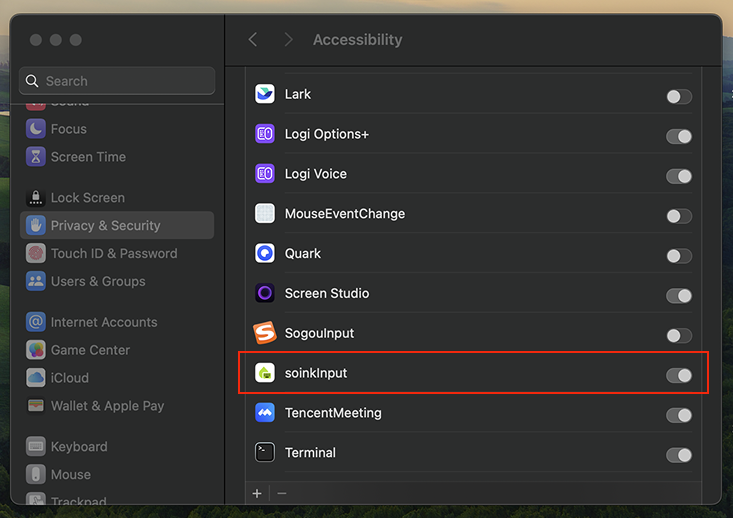
Accessibility permission in System Settings
← PreviousI press the shortcut and nothing happensNext →The shortcut conflicts with another app
soink

An AI voice keyboard for Mac. Talk to write, fix, and send. Live. Hands-free.

ProductFeaturesPricingChangelog
LearnStoryHelp center
ConnectDiscordEmail us
© 2026 AtaraFlow, LLCPrivacyTerms